
Mirror: Emoji maker, Stickers
Mirror AIPersonalization
4.35.60K Reviews
- Version
- 1.35.16
- Installs
- 10.00M
- Age Rating
- Everyone 10+
Screenshots

Our Review of Mirror: Emoji maker, Stickers
 Analysis by Appyee
I’ve found that the best way to judge a personal avatar app is not by how long I can spend adjusting a face, but by whether the result is easy to use in an ordinary chat. Mirror is built around that practical idea: make a cartoon version of yourself, shape its look, then use expressive images when a standard emoji feels too generic. It is a free personalization app from Mirror AI, and its 4.3 average rating across around 176,000 ratings suggests that plenty of people enjoy making that kind of small, personal touch.
Getting started and finding a comfortable workflow
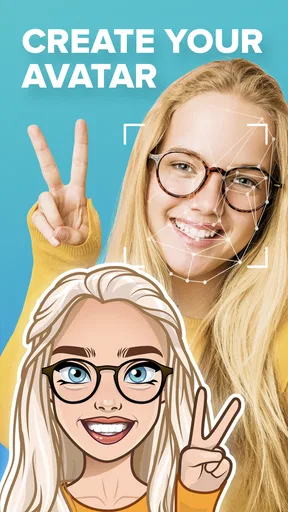
Diving into Mirror: Emoji maker, Stickers is super straightforward. Once you download and install it, the app prompts you to take a selfie. Now, I know what you're thinking – another app that wants a selfie! But hang in there. The app uses this photo to craft a personalized avatar that’s eerily accurate. It’s like looking in a cartoon mirror!
After the initial selfie, the app does its magic and creates a base avatar. From there, you can go wild customizing everything from hair color to outfits. I spent way too much time perfecting my virtual doppelgänger, but honestly, that's part of the fun.
That selfie-first approach is useful if you want a recognizable starting point, but it is not the only reason to try the app. If you would rather keep the result more stylized than realistic, think of the generated face as a draft rather than a final portrait. Small adjustments to hair, skin tone, facial details, and accessories can shift the mood without requiring you to make the avatar an exact copy of your appearance.
Features that Stand Out
One of the coolest features is the vast array of stickers and emojis you can create. The app doesn't just stop at a single avatar. You can incorporate your creation into a myriad of expressions and scenes. From funny to fierce, there’s a sticker for every mood.
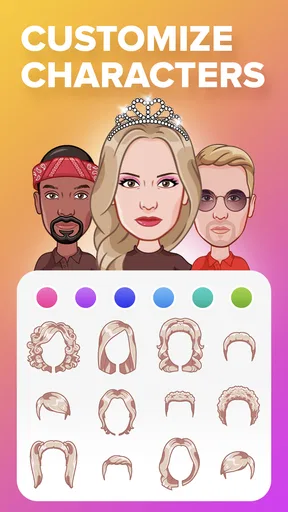
The app also allows for a great deal of customization. You can alter facial features, experiment with skin tones, and even add accessories. It's like having your own digital fashion studio. The level of detail is impressive, making each avatar truly unique.
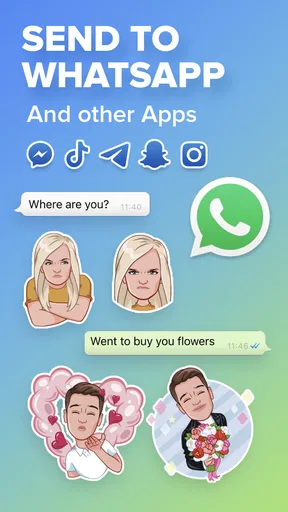
Not to mention, sharing your creations is a breeze. Whether you want to spice up your WhatsApp conversations or make your social media posts pop, Mirror has got you covered. Simply export your creations and share them wherever you please.
A useful way to make the customization feel less overwhelming is to decide on a purpose before you start browsing. For example, if you mainly want reactions for messaging, prioritize a look that reads clearly at small size and expressions you would actually send. A detailed accessory can be fun on a large image but may disappear when a sticker is reduced in a chat. I would make a few broadly useful choices first, then return to finer styling only if I find myself using the avatar regularly.
There is also a trade-off between making one polished character and making a face that can work across lots of moods. If you lean too heavily on a distinctive outfit or accessory, the avatar may feel less flexible in everyday messages. I prefer to keep the core appearance recognizable and let the expression or scene carry the joke. That approach makes the set feel more like a personal shorthand than a pile of unrelated cartoon images.
Where setup or sharing can feel confusing
The part that can take patience is not creating a face but working out where a finished image fits into your normal routine. Mirror’s appeal is tied to using its creations in conversations, while the exact path can depend on the place you want to share them. If you are trying to send something and do not see it where you expect, first look for the app’s export or sharing action rather than assuming the image has become part of every keyboard automatically.
It helps to test one creation in a low-stakes conversation before spending an evening building a large collection. That gives you a quick sense of how the image appears to the person receiving it and whether the sharing steps feel convenient on your device. If you mostly use WhatsApp, try the workflow there first; if you mainly post elsewhere, test that destination instead. The best sticker set is the one you can reach without interrupting a conversation to hunt through menus.
Mirror is aimed at casual self-expression, not at replacing a full illustration or graphic-design tool. I would not choose it when I need precise control over a custom drawing, a carefully composed image, or a professional-looking brand character. Its strength is turning a personal avatar into expressive material with relatively little effort. For people who want complete control over every line, a dedicated art app is a better fit.
User Experience
The app's interface is clean and user-friendly. Navigating through the options is intuitive, which means you don't need to be tech-savvy to enjoy it. The graphics are vibrant, making the whole experience visually appealing.
One thing I noticed is that the app runs smoothly without any hiccups. Loading times are minimal, and I didn’t encounter any crashes during my use. It’s refreshing to see an app that’s not only fun but also reliable.
As with any avatar app, the first result may not match what you had in mind. If the face seems off, I would make a small number of targeted changes instead of rebuilding the whole look at once. Adjust one feature, check the overall impression, and continue only if it improves the resemblance or style you want. This makes it easier to tell which choice helped, and it avoids spending time polishing details that are not noticeable in a sticker.
If something does not show up as expected, I would check the simple steps first: confirm the avatar is saved, return to the relevant sharing option, and try the export again. If sharing works in one place but not another, the destination app or its current setup may be the issue rather than the avatar itself. Restarting the app and checking that it is up to date are sensible general troubleshooting steps, too; they do not require changing your design or starting over.
Mirror is free to install, though it offers in-app purchases ranging from $3.99 to $44.99 per item. I would explore the free experience before paying for anything, especially if you are not sure how often you will use custom stickers. The app is rated Everyone 10+, has more than 10 million installs, and version 1.35.16 requires Android 9 or later. Those details make it easier to check basic suitability before downloading, but the best test is still whether the creation and sharing routine suits your own chats.
Choosing it over familiar emoji options
Compared with the standard emoji already on a phone, a personalized avatar can make a reaction feel more like it came from you. That difference matters most in chats with friends or family, where a familiar face or recurring expression can become a small in-joke. Standard emoji remain quicker when you need a universal symbol, and they do not ask you to build or maintain a character. I see Mirror as an expressive extra, not a replacement for the everyday emoji keyboard.
It also occupies a different space from avatar systems that are closely tied to one messaging platform. Mirror’s emphasis on creating stickers and sharing them gives it appeal if you want to use your cartoon self in more than one context. The practical trade-off is that export and handoff can involve an extra step compared with choosing an emoji already built into a keyboard. If you value speed above personalization, your existing keyboard is probably enough; if a recognizable custom reaction makes you smile, that extra step may be worthwhile.
For a realistic example, imagine a friend sends a message about a small mishap during the day. Instead of replying with the same laughing face everyone uses, you could pick a sticker that matches your avatar and the moment. The value is not that the app changes the conversation; it gives you a reaction that feels more personal. I would build a compact set for situations I encounter often—celebrating good news, reacting to a joke, or sending a quick hello—rather than trying to prepare an image for every possible mood.
This is a good fit for people who enjoy light customization, send lots of informal messages, or want a cartoon likeness for social posts. It is less suitable if you dislike selfie-based setup, rarely use stickers, or would rather not spend time adjusting a character. The experience also depends on being comfortable with the app’s route from creation to sharing. If that handoff feels like a chore in your usual messaging routine, the novelty may wear off even if you like the avatar itself.
Why You’ll Love Mirror
If you’re into personalization and creativity, Mirror: Emoji maker, Stickers will be right up your alley. It’s more than just an emoji maker – it’s a way to express yourself in the digital space. The joy of seeing your avatar come to life in various expressions is truly satisfying.
Plus, the social aspect of the app is fantastic. You can connect with friends and share your creations, making it a fun tool for digital interaction. The ability to send personalized stickers adds a personal touch that standard emojis just can’t match.
In practice, I think the strongest reason to keep using Mirror is not the number of possible styling choices but the way a consistent avatar makes reactions feel like part of your own voice. That works especially well when you have a few expressions you reach for repeatedly. If you like changing your look often, customization can be its own pastime; if you want a quick communication tool, settle on a design and spend more time using it than refining it.
It is also worth being realistic about how much variety you need. A large library can sound appealing, but a small collection of expressive images is often easier to find and more useful in actual conversations. I would save or export the creations I genuinely expect to use, then treat the rest as optional experimentation. That keeps the app from becoming another place where an unfinished collection demands attention.
A practical verdict
In a world full of apps, Mirror: Emoji maker, Stickers stands out as a delightful and engaging experience. Whether you're looking to inject some personality into your chats or simply want to have a bit of fun, this app delivers.
So go ahead, give it a shot. Create your avatar, explore the endless customization options, and let your imagination run wild. Who knew making emojis could be this entertaining?
My recommendation is to try it with one clear goal: create a recognizable avatar and see whether you enjoy using its stickers in the places you already chat. If the setup feels enjoyable and sharing becomes part of your routine, Mirror can be a charming personalization tool. If you only want fast, universal reactions, the default emoji on your phone will be simpler. That distinction is the fairest way to decide whether this particular app earns a place on your device.
Verdict
Strengths of Mirror: Emoji maker, Stickers
- Highly customizable emoji options.
- User-friendly interface and design.
- Wide variety of sticker packs.
- Regular updates with new features.
- Compatible with most messaging apps.
Limitations of Mirror: Emoji maker, Stickers
- In-app purchases can be pricey.
- Some features require a stable internet.
- Occasional lag on older devices.
- Limited free content available.
- Advertisements can be intrusive.
Similar Picks in This Category
View All
Microsoft SwiftKey AI Keyboard
SwiftKey4.3

Wallpapers
Google LLC4.1

Zedge™ Wallpapers & Ringtones
Zedge4.7

Yandex Browser with Alice AI
Direct Cursus Computer Systems Trading LLC4.3

Ringtone Maker:create ringtone
Big Bang Inc.4.7

Fonts Keyboard
Fonts Keyboard3.9
Frequently Asked Questions
What features does Mirror: Emoji Maker, Stickers offer?
Mirror: Emoji Maker, Stickers allows users to create personalized emojis using their own selfies. The app offers a variety of customization options, including hairstyles, accessories, and expressions. Additionally, it provides an array of stickers and GIFs that can be integrated into messaging apps for a more personalized communication experience.
Is Mirror: Emoji Maker, Stickers easy to use for beginners?
Yes, the app is designed with user-friendliness in mind. It features an intuitive interface that guides users through the emoji creation process step-by-step. Even those who are not tech-savvy can easily navigate the app and create custom emojis in just a few minutes.
Does Mirror: Emoji Maker, Stickers support multiple languages?
Yes, the app supports multiple languages, making it accessible to a global audience. Users can select their preferred language from the settings menu, ensuring that they can comfortably navigate and utilize all the features the app has to offer without language barriers.
Are there any in-app purchases or subscriptions in Mirror: Emoji Maker, Stickers?
Mirror: Emoji Maker, Stickers is free to download and use, but it includes optional in-app purchases. Users can buy additional customization packs and features to enhance their emoji creation experience. These purchases are optional and not necessary to enjoy the basic features of the app.
Can I share the emojis and stickers created with Mirror on social media?
Absolutely! Mirror: Emoji Maker, Stickers allows users to share their creations directly on social media platforms like Instagram, Facebook, and WhatsApp. The app provides easy sharing options that let you showcase your personalized emojis and stickers with friends and followers effortlessly.
